Creating and implementing game-play classes Unreal Engine use C++ for programming language so when we creating game-play C++ class in engine this is comprised in header file (.h) and a source file (.cpp). Header file and Source file Declarations of the class and its members like variables and functions Where the functionality is defined by …
Author Archives: l4kkwhy l4kkwhy
Blog System With Blogger API Integration (MEAN)
Blog System EXPRESS JavaScript and ANGULAR Hello World, I made a Blog System Web Application for My Blogging but i don’t use this. Why i don’t use i don’t know!!! Technology (This project Made on Linux OS System ) Angular (Fronted) Node JavaScript (Express JavaScript Back-end ) MongoDB (Database) File System : Back-end -> server.js …
Continue reading “Blog System With Blogger API Integration (MEAN)”
Unreal-Engine-C-Programming – Components and Collision -part-6/10
Create Components; Make a Pawn Class Name it what you want We make a components move and collide with solid objects; Creating Properties Colide_Pawn.h UParticleSystemComponent* OurParticalSystem; Colide_Pawn.cpp in Constructor we create : Sphere Component Static Mesh Component Spring Arm Component Camera Component We need Import Files first : #include “Classes/Components/SphereComponent.h” #include “Classes/Components/StaticMeshComponent.h” #include “ConstructorHelpers.h” #include …
Continue reading “Unreal-Engine-C-Programming – Components and Collision -part-6/10”
Unreal-Engine-C-Programming-Pawan And Input-Getting-With-part-5/10
First We Make Pawn Class Pawn means Actor this controlled by Input with Humans or AI Second Select Pawn Create! Open Header file UPROPERTY(EditAnywhere) USceneComponent* OurVisibleComponent; Goes to cpp file Include files #include “Components/StaticMeshComponent.h” #include “Components/InputComponent.h” AutoPossessPlayer = EAutoReceiveInput::Player0; Setup this code AMyPawnWithInput::AMyPawnWithInput() { // Set this pawn to call Tick() every frame. You can …
Continue reading “Unreal-Engine-C-Programming-Pawan And Input-Getting-With-part-5/10”
Unreal-Engine-C-Programming-Camera-Change-Getting-With-part-4-10
Camera Change Create Two Cameras with two methods Go to Modes and Select Basics Classes cheke this First Camera Second Method – Modes – Basics – Cube – Select Cube – Click On Add Component – Camera (rename this) Second Camera adding with Cube Now Create class Open Your IDE write codeIn Header file UPROPERTY …
Continue reading “Unreal-Engine-C-Programming-Camera-Change-Getting-With-part-4-10”
Unreal Engine C++ Programming |Transforms & Mesh| Getting With part-3/10
Transform 1.Open Class which you make part-1 and part-22.Open class header file and //Transforms UPROPERTY (EditAnywhere) AActor* player; Compile code compile Now Property show on Details panel Add player Set player Now write some code for player when go to actor or object get location. float dist = this->GetDistanceTo(player); Now again go to header …
Continue reading “Unreal Engine C++ Programming |Transforms & Mesh| Getting With part-3/10”
Unreal Engine C++ Programming |Static Mesh| Getting With part-2/10
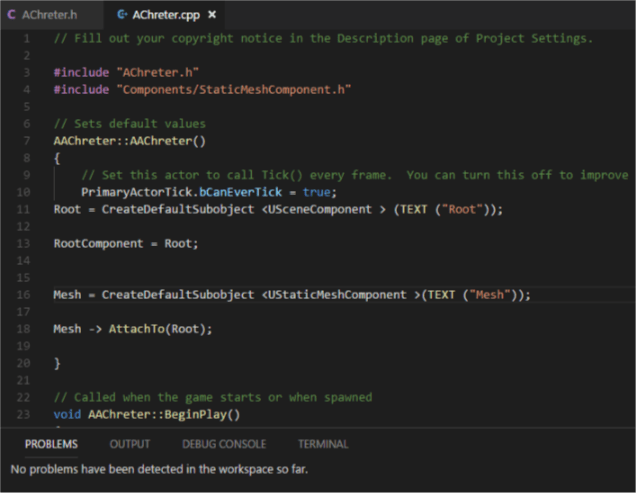
Create Static Mesh First Open C++ Class in IDE Open C++ Class double click 2.Open header file Code : #pragma once #include “CoreMinimal.h” #include “GameFramework/Actor.h” #include “AChreter.generated.h” UCLASS() class CPLUSTHIREDBOOKNEW_API AAChreter : public AActor { GENERATED_BODY() public: // Sets default values for this actor’s properties AAChreter(); protected: // Called when the game starts or …
Continue reading “Unreal Engine C++ Programming |Static Mesh| Getting With part-2/10”
Unreal Engine C++ Programming Getting With part-1/10
Create C++ Class In Unreal Engine 4.18 1.Make A new Project With New C++ Project 2.Create New C++ class in Editor . 3.Select Actor. Change 4.Open your code editor. Click On Edit Preferences Add Your Editor Check Your class code (Visual Studio Code)
Unreal Engine 4.18 C++ Basics Class Definition Part-2
Class File and Header File Introduction Class file generate the files open in your IDE so you can editing it. Code::: #include “GameFramework/Actor.h” #include “MyActor.generated.h” UCLASS() class AMyActor : public AActor { GENERATED_BODY() public: // Sets default values for this actor’s properties AMyActor(); // Called every frame virtual void Tick( …
Continue reading “Unreal Engine 4.18 C++ Basics Class Definition Part-2”
Unreal Engine 4.18 C++ Let’s Started
Unreal Engine C++ Unreal engine is awesome Game Engine for Game Developers. Unreal most important its development tools with great power. Unreal Engine 4 Virtual Scripting call Blueprint for designer’s And C++ programming Language for Programmers this most important feature of this engine. Why Unreal Engine C++? C++ is most important language for high performances …
 L4's Blog